Introducing the Touchpix CRM: run your photo booth business in one place
Your events already live in Touchpix. Until now, your bookings, clients and staff probably lived somewhere else: a spreadsheet, a paper diary, a group chat. With the new CRM, they come together in the same place you design your events.
Open it from the CRM tab in the top menu.
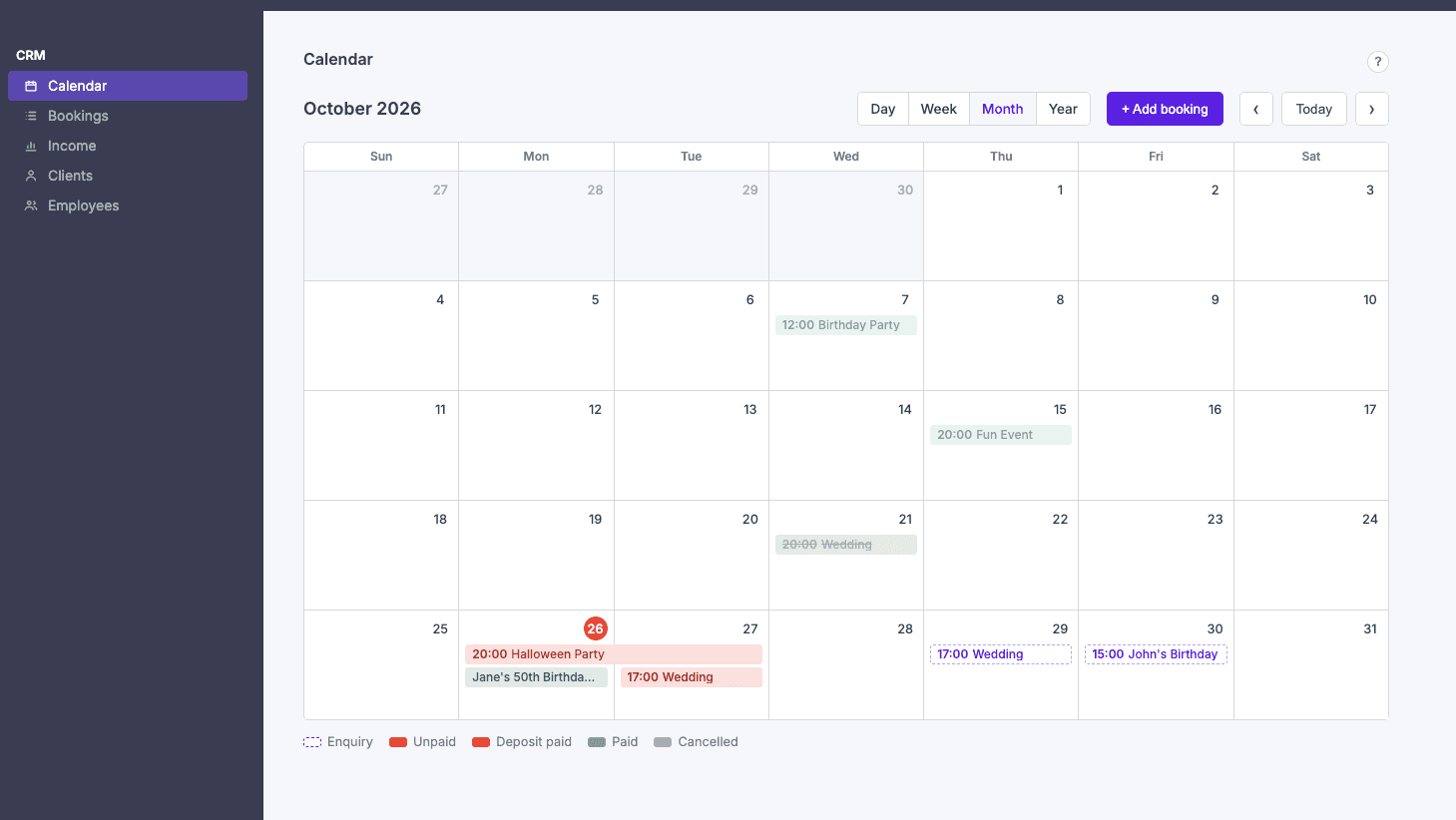
A calendar built around your bookings
The Calendar shows your bookings by day, week, month or year. Add a booking straight from the calendar and fill in what you know: title, date and time, location, client, price and deposit. Each booking has a status: Enquiry, Unpaid, Deposit paid, Paid or Cancelled. That way you can see at a glance which jobs are confirmed and which still need a follow-up.
Know who's working, and who's already busy
Add your team under Employees and assign them to bookings. If someone is already booked at the same time, the CRM flags them as Busy and tells you which booking they're on, so you avoid double-booking before it happens. You can mark employees as unavailable when they shouldn't be offered for new jobs.
All your clients, with their balance
Clients keeps every customer's contact details and notes, together with their bookings. For each client you see the total booked, what's been paid and what's still outstanding. Filter the list to see who still owes you money, or which clients haven't booked yet.
See how your year is going
The Income overview shows your bookings month by month for the year, with totals, payments and the outstanding balance. It also shows your top clients by income and by amount still owed. Open enquiries are listed separately, so they don't inflate your numbers.
Connected to your Touchpix events
A booking can be linked to a Touchpix event. Pick an existing event, or create a new one from inside the booking, and jump to it whenever you need to edit the design or settings. The CRM and your events stay separate, so planning a booking never changes an event you've already set up.
Search, sort and filter everything
Every list (bookings, clients and employees) can be searched, sorted by column and filtered. Bookings can also be filtered by date range.
Try it today
The CRM is available now in the Touchpix Event Creator. Without an active subscription you can add one booking, one client and one employee to try it out. With a subscription, there's no limit.
Note: the CRM doesn't process payments. A booking's status is your own record of what has been paid.